

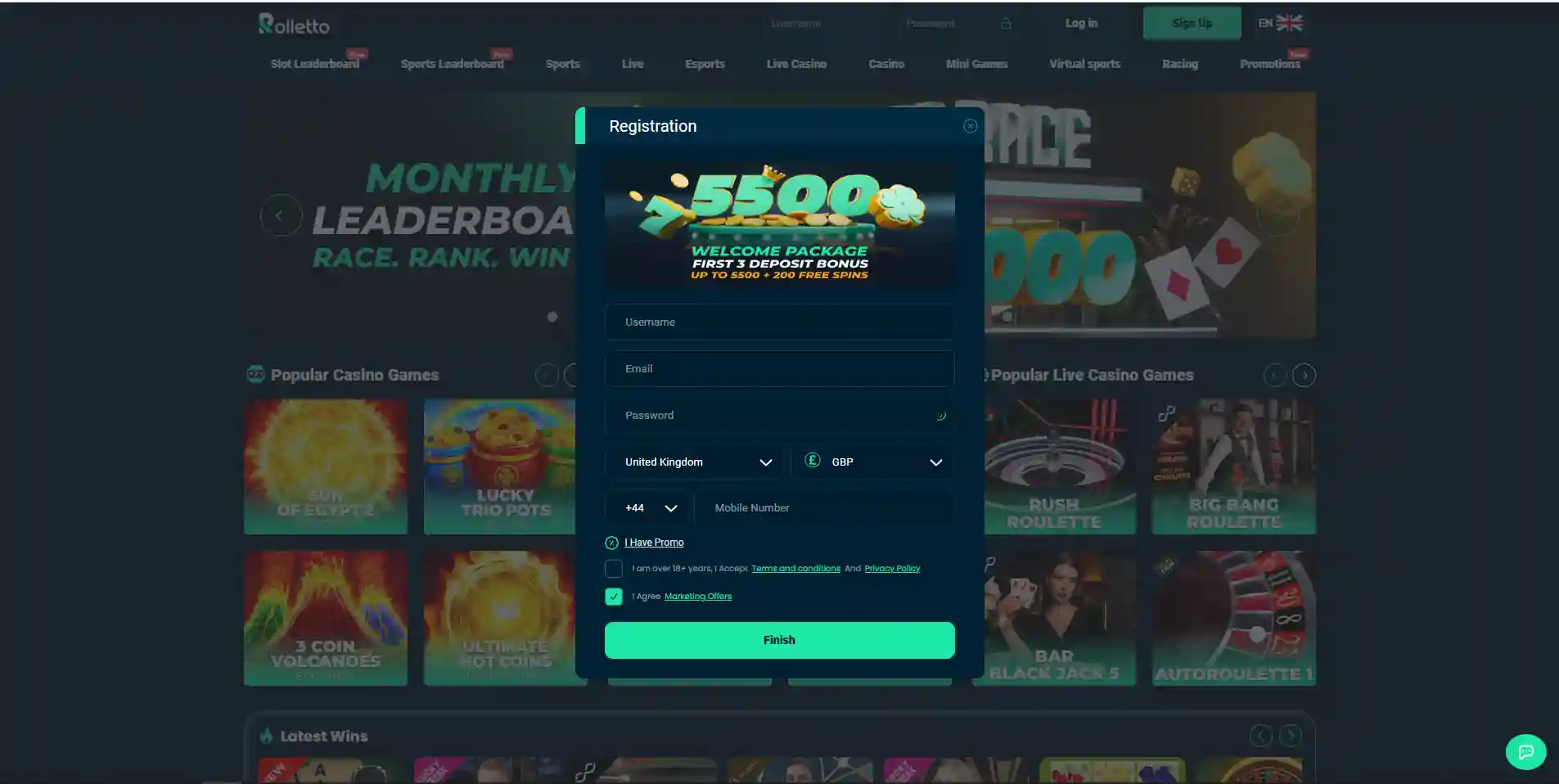
Rolletto’s official FAQ describes a simple initial registration stage using an email address, username and password, followed by acceptance of the Terms and Conditions and Privacy Policy. After the account is created, the FAQ describes a separate profile-completion stage where first name, last name, date of birth, mobile number, country, city and address can be added so the account can be verified more fully.
The public information confirms this general registration sequence, but it does not confirm that a UK country option is currently shown in the live sign-up form. Identity verification can be requested by Rolletto, while exact document requirements and KYC timing are covered in the separate verification guide. For Great Britain, UKGC age-verification rules are included below only as a regulated-market benchmark and do not establish Rolletto’s own onboarding sequence.
The registration guide relies on Rolletto’s current public FAQ and the live blank registration form.
Rolletto Account Registration Steps and ID Requirements
| Stage | Verified information | What this guide does not assume |
|---|---|---|
| Initial sign-up | Email address, username and password are described in the official FAQ. | No claim that every historical field or country option is still identical today. |
| Agreement | The FAQ instructs the user to accept the Terms and Conditions and Privacy Policy before finishing registration. | No claim that accepting terms proves eligibility in a particular jurisdiction. |
| Profile completion | The FAQ lists first name, last name, date of birth, mobile number, country, city and address as profile information used for fuller verification. | No claim about a guaranteed UK country selector in the live form. |
| Identity checks | Rolletto may request identity verification and supporting documentation. | No invented KYC completion time or guaranteed no-KYC access. |
Step 1: start from the verified official site
Registration should begin from the verified official domain rather than a copied form, search advert or third-party APK. The official FAQ describes a Sign Up control on the main site that leads to the registration fields. Because Rolletto’s mobile access is browser-based according to current sources, the same domain check matters on a phone as it does on desktop.
Before entering personal data, confirm the address and read the current terms that the form presents. This is especially important for a UK reader because the existence of an English interface or GBP-facing content does not by itself prove that a particular account location is accepted at that moment. No UK country-field result is stated here because it was not directly observed.
If you are registering from a phone, the mobile access explains the browser model and why an unverified app or APK should not be used as a substitute for the official web route.
Step 2: email, username and password
Rolletto’s official FAQ states that the initial form presents three fields: email address, username and password. It also says the username cannot be changed and describes a password rule of at least eight characters, including one uppercase letter and at least one alphanumeric character. Because password rules can change, the live form remains the final authority if its validation message differs from the FAQ.
Use an email address you control and a password that is unique to this account. A unique password is practical security advice rather than a Rolletto-specific technical claim. Avoid reusing a password from email, banking or another gambling account, because reuse turns one credential leak into a problem across several services.
The FAQ also explains that validation errors are shown if a field is completed incorrectly. Do not repeatedly guess at a rejected format. Read the field message, correct only the relevant item and keep a record of the email address and username you actually used.
Step 3: accept the current terms before finishing
The FAQ describes a checkbox confirming acceptance of the Terms and Conditions and Privacy Policy before the registration is finished. Treat that step as a real agreement, not a cosmetic box. The current terms can govern account use, verification, payments, withdrawals and other important conditions.
This page does not merge bonus activation into registration. A welcome offer can have its own eligibility and activation rules, and those can change separately from the account-opening flow. If a promotion is relevant to your decision, review the current offer terms separately before depositing rather than treating account creation as automatic bonus activation.
Likewise, the ability to create an account should not be read as proof that every payment method will be available. Payment options are dynamic and can depend on account conditions. The payment methods separates verified platform categories from live cashier availability.
Step 4: complete the personal-information profile
The official FAQ describes a second layer after the initial account is created. In the Personal Information area, it says username, password and email are already filled, while the user can complete first name, last name, date of birth, mobile number, country, city and address. The FAQ links this profile completion to fuller account verification and access to additional payment functionality.
Enter personal details accurately. A date of birth or address that is deliberately wrong can create problems later when identity checks compare account information with evidence. The public registration information does not confirm that every field appears in the same visual order today, so the current interface should be followed if the layout differs from the FAQ description.
The country field deserves particular care. Third-party search pages may list countries that are not offered on the current registration form. Check the live form to see whether the United Kingdom appears as a selectable option before relying on those listings.
Identity verification: what registration does and does not prove
Rolletto may request identity verification and supporting documentation. Exact document requirements and timing can vary. For identity-check details, see verification and KYC.
Registration and verification should also be treated as different stages. Creating login credentials is not the same as completing every identity check that may be required later. A user should therefore keep account information accurate from the start and be prepared for the possibility that Rolletto asks for supporting evidence before some account actions are completed.
This distinction is useful when comparing reviews. A statement such as “sign-up takes two minutes” says nothing about later verification and can become misleading if it is presented as the total onboarding time. This guide does not publish a stopwatch claim because the time depends on the user, the interface and any verification request.
Great Britain age verification: a market benchmark, not a Rolletto rule
The Gambling Commission requires UKGC-licensed remote operators to verify a customer’s age before the customer can deposit funds, access free-to-play gambling games or gamble using money, a free bet or a bonus. The current rule is set out in the Commission’s remote social responsibility code 3.2.11.
That is important context for readers in Great Britain because it shows what the locally licensed market requires. It must not be converted into a statement that Rolletto follows the same onboarding sequence; the UKGC requirements are a comparison benchmark rather than proof of Rolletto’s own procedure.
The distinction also prevents a common error in UK-facing casino content: describing every operator that accepts English-language registrations as though it participates in the UKGC framework. Account language, currency options and registration fields are product facts, while regulatory status is a separate question. For the full distinction, see the licence status.
Account security basics after sign-up
Once the account exists, the priority shifts from form completion to credential control. Keep the username and password private, avoid entering them into pages reached through suspicious messages, and return to the verified site address when in doubt. A browser bookmark can reduce the need to rely on search results every time.
If an account detail is wrong, use the account tools or support route rather than creating a second account to work around the problem. The available information does not establish a duplicate-account policy, but maintaining one accurate identity record is the practical approach when an operator can request verification.
Do not share verification files through unofficial chat accounts, social-media profiles or file-request links that cannot be traced to the operator’s real site or support process. The existence of a document request does not remove the need to verify where the upload is being sent.
Registration checklist for a UK reader
- Start at the verified official domain and open the current registration form.
- Confirm the live fields rather than relying on an old image or third-party sign-up guide.
- Use an email address you control, choose the username carefully and create a unique password.
- Read the current Terms and Conditions and Privacy Policy before accepting them.
- Do not assume UK country availability unless the live form actually presents it for your session.
- Complete profile information accurately if the account asks for it.
- Expect that identity verification can be requested, but do not rely on an affiliate site’s promised completion time.
- Check payment availability in the live cashier before depositing.
- If you are in Great Britain, understand that UKGC age-verification rules describe the locally licensed market and are not automatically Rolletto obligations.
Use this checklist as a practical sequence for account setup, with extra care around fields or requirements that can vary in the live form.
Registration verdict
Rolletto’s documented registration flow begins with email, username and password, followed by agreement to the current terms. The official FAQ then describes profile completion with personal information including name, date of birth, mobile number, country, city and address. Rolletto may request identity verification, so accurate data at sign-up matters even when the initial form is short.
The main UK-specific caution is precision. This page does not claim that the live form currently offers a UK country option because that was not directly observed, and it does not describe Rolletto as following UKGC onboarding rules. For Great Britain, the UKGC age-verification requirement is useful regulatory context only. For a wider decision on the brand, product range and regulatory position, return to the Rolletto review.
Material created by the team Rolletto